

💡 Beginner Executive Summary
Are you curious about How WordPress Works under the hood without getting bogged down by complicated code or overwhelming jargon? In this friendly 2025 guide by Teracology, we unpack exactly how does WordPress work, detailing the WordPress architecture, the role of the WordPress database, and how the WordPress loop renders content effortlessly.
Discovering How WordPress Works is the single most rewarding milestone for beginners and non-technical website owners. At first glance, you might assume running a website requires advanced coding skills. However, the core concept behind how does WordPress work is surprisingly simple and mirrors building a modern modular house.
Think of your website as a physical home: the framework is the solid foundation, your themes act as interior design and paint, plugins represent modern appliances adding smart features, and the WordPress database serves as a secure filing cabinet storing your valuable documents. Once you grasp this breakdown, managing your site becomes simple and enjoyable.
How Does WordPress Work When a Visitor Opens Your Site?
To understand how does WordPress work during a normal visitor session, imagine a guest walking into a restaurant and placing an order. Here is the seamless 5-step process executing in less than one second behind the scenes:
- Incoming Visitor Request: A visitor types your domain, sending a request to the web server which routes it to WordPress.
- Environment Initialization: WordPress connects securely to the WordPress database to fetch global settings.
- Plugin Execution: Active plugins fire up to handle security, caching, and custom functionality.
- Content Fetching via WordPress Loop: The central WordPress loop queries the database to retrieve targeted articles.
- Page Rendering: Content merges with theme layout files to output a beautiful webpage to the browser.
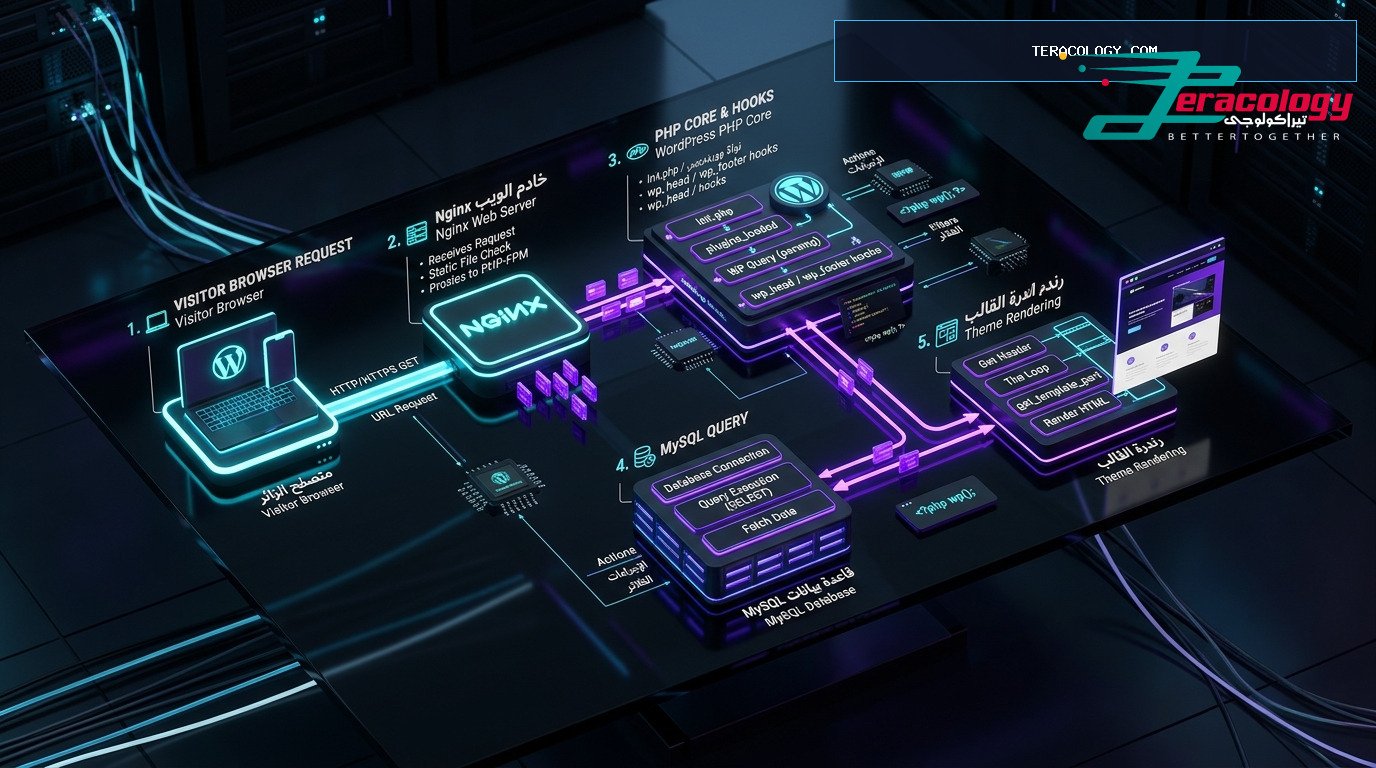
The 4 Pillars of WordPress Architecture Explained for Beginners
To master How WordPress Works completely, let us examine the four main components of the overall WordPress architecture and how they coordinate together seamlessly:
The core engine governs security, URL routing, user login authentication, and user role management. Built to be lightweight, core handles thousands of daily visitors smoothly.
The WordPress database is the central digital vault of your website. It holds all your blog posts, page text, comments, user credentials, and plugin configurations. The structured tables in the WordPress database allow instant retrieval of information whenever a visitor loads a page.

Your theme controls the visual presentation. Themes let you customize colors, fonts, headers, and layouts with a single click without affecting your written articles stored inside the WordPress database.
Plugins provide modular features. Want an online shop? Add WooCommerce. Want to rank higher on Google? Add Rank Math. Plugins extend the WordPress architecture effortlessly.
What Is the WordPress Loop and How Does It Display Posts?
When exploring How WordPress Works, you will frequently encounter the term WordPress loop. Don’t be intimidated—the concept is very straightforward!
Think of the WordPress loop as a helpful librarian. When a visitor requests your blog page, the WordPress loop checks the WordPress database to see if articles exist. If yes, it fetches the first post, formats its title, image, and text, then moves to the second post, and continues until the list is complete. This simple automated loop keeps your website dynamic and fresh automatically whenever you publish new content.
Comparing How Does WordPress Work vs Traditional Static Websites
To clarify how does WordPress work to simplify website management, review this straightforward comparison matrix:
| Feature | How WordPress Works (Dynamic CMS) | Old Traditional Static HTML Sites |
|---|---|---|
| Publishing Content | Visual editor like Word with 1-click publish | Requires writing code and editing raw files |
| Design Updates | Switch themes instantly from dashboard | Must redesign every individual HTML file |
| Data Organization | Stored neatly inside WordPress database | Scattered across manual server folders |
| Automated Feeds | Powered by automated WordPress loop | Must link every new page manually |
| Beginner Accessibility | 100% Beginner friendly with zero coding | Complex and requires hiring developers |
5 Practical Tips for Beginners to Manage WordPress Smoothly
Now that you understand How WordPress Works and the foundation of WordPress architecture, follow these essential tips:
- Keep Core, Themes, and Plugins Updated: Regular updates protect your site and unlock new features.
- Avoid Plugin Overload: Install only essential plugins to prevent cluttering the WordPress database.
- Utilize Caching Plugins: Caching creates pre-rendered pages, reducing repetitive WordPress loop queries.
- Compress Images Before Uploading: Lightweight images improve site speed and boost SEO rankings.
- Schedule Regular Backups: Automated backups keep your content and WordPress database safe.
Frequently Asked Questions: How WordPress Works
Do beginners need coding skills to understand How WordPress Works?
How does WordPress work when uninstalling a plugin?
What is the benefit of the WordPress loop for bloggers?
For technical references, visit WordPress.org and inspect web statistics on W3Techs. Read our beginner guide on What Is WordPress and Its Uses.
How Does WordPress Work with Media and Images for Beginners?
Managing images and media files is a central part of creating engaging content. Beginners often ask: how does WordPress work when handling uploaded media, and how does it connect images to published posts?
The system executes two automated steps behind the scenes. First, it creates scaled versions of your image (thumbnail, medium, large) and saves them in the media uploads directory on your server. Second, it creates a dedicated record inside the WordPress database linking the image URL directly to your post. When the WordPress loop runs to display the article, it automatically fetches and displays the image without requiring manual HTML embedding.
Real-World Scenarios Explaining How WordPress Works
To deepen your understanding of How WordPress Works, let us explore three common real-world scenarios every site owner experiences:
When you open the block editor, write your thoughts, and click “Publish”, WordPress immediately writes the text to the WordPress database and marks its status as “published”. Instantly, the automated WordPress loop displays your new post at the top of your blog feed without needing manual page updates.
When installing a plugin, WordPress reads its configuration files and creates dedicated settings rows inside the WordPress database. Understanding the flexible WordPress architecture shows how plugins extend functionality seamlessly across your entire website.
Are you worried about losing content when changing your site design? Don’t be! One of the greatest features of how does WordPress work is the total separation between visual presentation and core content. Your posts remain untouched inside the WordPress database, while the new theme transforms your layout instantly.
Simple Maintenance Checklist for Non-Technical Beginners
Keep your site running smoothly with this simple weekly maintenance routine:
- Perform Weekly Updates: Log into your dashboard weekly to update core files, themes, and trusted plugins.
- Clean Up Unused Drafts: Deleting abandoned post drafts keeps the WordPress database lean and fast.
- Filter Spam Comments: Use tools like Akismet to auto-delete spam comments before they accumulate.
- Optimize Uploaded Media: Use modern WebP image formats to ensure fast page load speeds.
Conclusion & Next Steps for Building Your Website
In conclusion, mastering How WordPress Works and understanding the core WordPress architecture gives you absolute freedom to build an influential online presence. WordPress handles complex technical rendering so you can focus entirely on growing your business and publishing great content.
How Does WordPress Work with Data Protection and Backups?
A primary concern for non-technical beginners is data safety. When studying How WordPress Works, you discover that the overall WordPress architecture isolates physical design templates from core data stored inside the WordPress database.
This modular separation allows you to generate complete site backups with a single click. Should any technical issue occur, restoring your WordPress database instantly brings back all your published posts, while the WordPress loop resumes rendering your content effortlessly.
How Does WordPress Work When Scaling Traffic for Growing Sites?
As your website grows from hundreds to thousands of daily visitors, site owners wonder: How WordPress Works under heavy traffic, and does how does WordPress work remain fast and reliable?
The strength of WordPress architecture lies in its database query optimization. When you activate caching, WordPress pauses running the WordPress loop for every single request, serving pre-rendered HTML copies stored in memory instead. This allows the WordPress database to support tens of thousands of concurrent visitors effortlessly.
Daily Operations Summary Table for Beginners
| Operational Task | Strategic Objective | How Does WordPress Work to Handle It? |
|---|---|---|
| Publishing New Articles | Attract organic Google search traffic | Writes text to WordPress database and executes WordPress loop automatically |
| Updating Plugins & Themes | Maintain core security and stability | Replaces core files automatically via 1-click dashboard controls |
| Backing Up Site Files | Protect digital assets against data loss | Saves a full snapshot of files and WordPress database off-site |
❓ How WordPress Works FAQ
Q: What is The Loop in WordPress architecture?
A: The Loop is the PHP code structure used by WordPress to query post content from the database and render it inside template files.